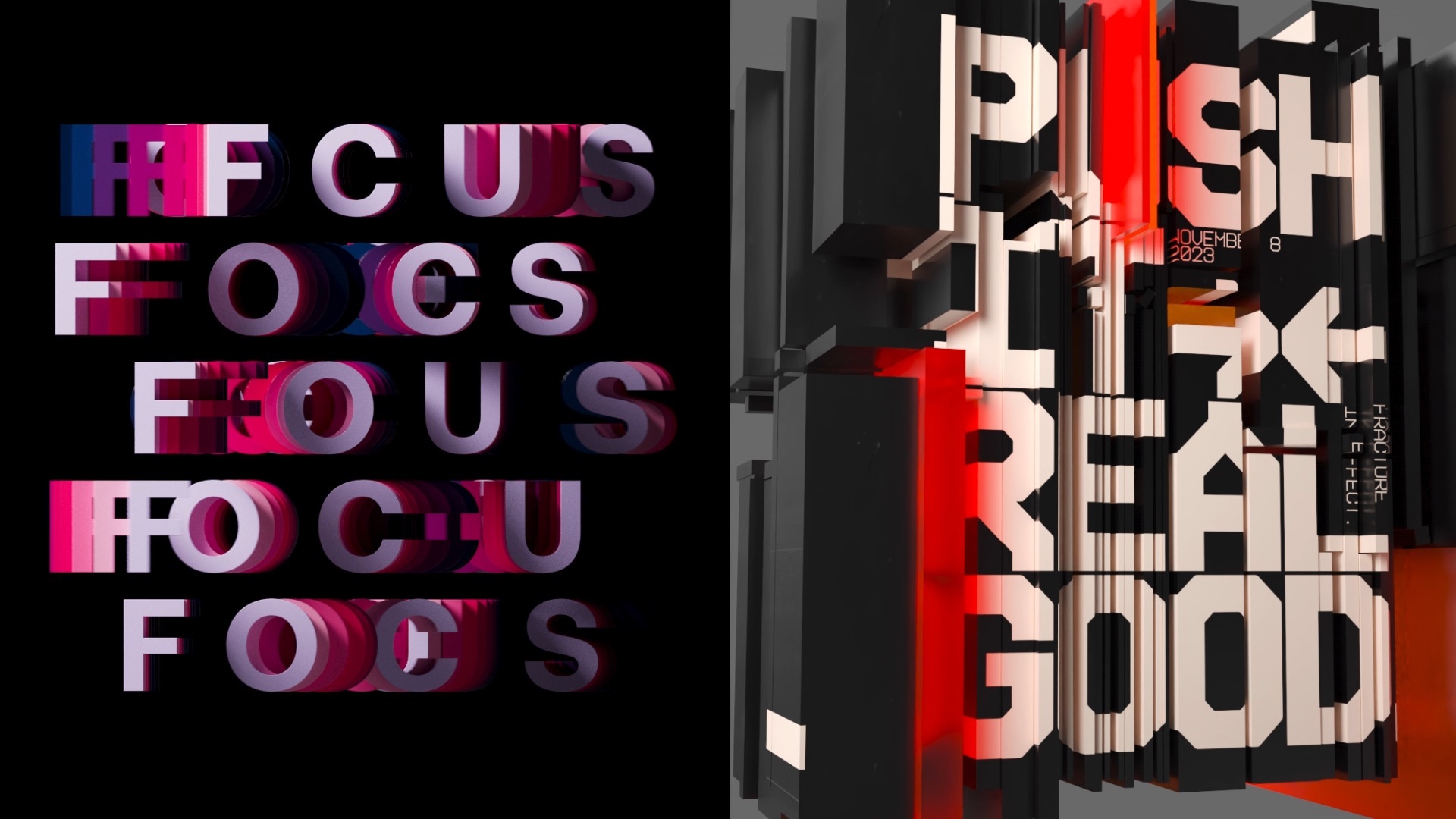


Kinetic typography in true 3D

For motion designers and title artists who want animated text that goes beyond a template

Animate real 3D text with the same MoGraph system behind broadcast and film titles. Build a word in Cinema 4D and kern it with precision. Animate it with Effectors and mask the transitions with Fields. Add simulation so the type can inflate or shatter while the effect stays procedural and a single text string drives the whole scene. Render on the GPU with Redshift. Or send the scene to After Effects with Cineware. Start free for 14 days.

Kinetic typography in true 3D

What is kinetic typography?

Kinetic typography is moving text. Letters and words animate to carry energy and meaning, from broadcast title cards to social and film main titles. Most kinetic type is made in 2D inside an editor or motion tool, often starting from a preset. Cinema 4D takes the work into a third dimension. Real extruded letterforms gain depth and physics. MoGraph animates them without hand-keyframing, and because the letters are true 3D objects they take real lighting, highlights, and drop shadows that a flat 2D layer only fakes. The type stays editable to the final frame.

Benefits

Templates get you a clean fly-in text and stop there. When the brief needs a custom move, a letter that inflates, or a line that shatters, a preset cannot follow. Cinema 4D builds the effect from scratch with Effectors and simulation, so the look is uniquely yours rather than one a hundred other channels already shipped.

MoGraph treats each letter or line as something you can animate on its own. Drop an Effector to stagger a reveal or add a Field to sweep a transition across the phrase. Drive the whole setup from one text string. Change the word and the animation follows without re-keying by hand.

Cinema 4D works alongside your motion and editing tools rather than replacing them. Render finished frames on the GPU with Redshift, which comes with every Cinema 4D subscription. Or link the live scene into After Effects with Cineware to keep adjusting the 3D text next to your comp. For lighter work that stays in 2D, Red Giant Universe runs preset text effects inside the host you already edit in. The 3D build and the in-host finish share one pipeline.

Our Users

Broadcast motion designer

Capabilities

Text object turns any string into real geometry: extruded letters with bevels and depth, in materials you can light. This is not a 2D layer with a drop shadow faking dimension. It is 3D type you can orbit and relight, with a camera that moves through it.

  • Extruded letterforms with custom bevels
  • Per-character, per-word, per-line control
  • Precision kerning controls
  • Ready-made Redshift materials, lighting, and depth of field
  • Camera moves through the type

MoGraph drives the motion. Effectors animate a word's position, scale, and rotation without hand-keyframing each letter. Fields control where an effect applies and how it falls off, so a transition can sweep a phrase or mask a reveal. Simulation adds physics that can inflate or shatter the type.

  • MoGraph Effectors
  • Fields for masks and falloffs
  • Dynamics: shatter, bounce, inflate, burn
  • Procedural, non-destructive setups
  • Takes for batch variations

A finished kinetic-type shot has to render and reach your edit. Redshift renders the 3D type on the GPU at production quality. Cineware links the live Cinema 4D scene into After Effects, so the type stays editable next to your comp.

  • GPU rendering with Redshift
  • Redshift included with Cinema 4D
  • Cineware scene link to After Effects
  • Standard OBJ / FBX export
  • Universe text presets in your host

Our Solutions

Kinetic typography in 3D pulls on a few tools, and they come together in Maxon One. Cinema 4D builds and animates the type. Redshift renders it. Red Giant Universe adds preset text effects inside your host editor. A Maxon One subscription covers the whole set, so the 3D work and the in-host finish stay connected in one pipeline.

Maxon Cinema 4 D Mark Primary 200px
Cinema 4D

The industry-standard 3D toolset for broadcast and film title work. Builds real 3D text and animates it through MoGraph. Text object creates extruded letterforms; Effectors and Fields drive the motion; simulation adds physics. Procedural setups keep every effect editable from a single text string, and Takes render batches of variations.


Maxon Red Giant Mark Primary 200px
Red Giant

Preset-driven text effects that run inside your host editor for work that stays in 2D. Typographic and Type On handle fly-on text; Title Motion and Type Cast animate titles; Hacker Text adds a decoding look. The presets bake in professional timing and easing, and you can save your own customized versions alongside them.

Maxon Redshift Mark Primary 200px
Redshift

GPU rendering for 3D type at production quality. Light the letters and set up materials and depth of field. Final frames render fast on the GPU, and Redshift comes with every Cinema 4D subscription.

Maxon One Mark Primary 200px
Maxon One

Cinema 4D, Red Giant, and Redshift come in one subscription. Maxon One covers the whole path from the 3D build to the rendered, in-host finish.

Tutorials

Cinema 4D's typography tools run deep, but you can get started quickly with a guided build. Three places to start, from first principles to a full kinetic-type setup.

Case studies

Testimonials

How it works

A kinetic-type build in Cinema 4D runs a short arc: set the text, animate it, add physics, then render or hand it off. The four steps below follow that arc on a single headline, from a blank scene to a finished shot.

1. Set and kern the text

Create a Text object and type the headline. Use Cinema 4D's kerning controls to set the spacing, because typography quality starts with the letterforms before anything moves. Extrude the text to give it real depth and a bevel.

2. Animate with an Effector

Add a MoGraph Effector and watch the letters stagger or scale into place. Adjust one Effector and the whole phrase re-times. Add a Field to mask the move across part of the word, so the animation reads as designed rather than uniform.

3. Add physics

Bring in simulation to break the type into pieces or inflate it. A few settings turn a clean reveal into a custom effect a preset cannot reproduce. The setup stays procedural, so the word and the motion remain editable.

4. Render or hand off

Render final frames with Redshift on the GPU, or link the scene into After Effects with Cineware to finish next to your comp. Pull ready-made looks from Redshift's large material library in the Asset Browser, so the type can be metal, wood, rubber, carbon fiber, clay, or almost any finish without building a shader from scratch. Store variants in Takes and batch-render a set when a campaign needs several versions.

What is kinetic typography?

Kinetic typography is animated text, the letters and words that move to express emotion, convey information, or emphasize a message. Kinetic type appears in title sequences, ad spots, and social video. In 3D, kinetic type gains real depth and physics rather than remaining a flat moving layer.

Can Cinema 4D do kinetic typography?

Yes, this is one of the tool's strengths. Text object creates real 3D letterforms. The MoGraph system animates them with Effectors for motion and Fields for the transitions. Most of it runs without keyframing each letter by hand.

Do I need Cinema 4D, or can I work in my editor?

Either route can work, depending on the shot. For 2D text effects, Red Giant Universe runs presets right inside the editor you already use. When you need real 3D type or text combined with bigger effects, Cinema 4D is the tool. Cineware then sends the result back into After Effects.

Is 3D text in Cinema 4D hard to learn?

Not as hard as many expect, given the payoff. Because 3D text is part of the MoGraph system, the same Effectors and Fields used elsewhere in Cinema 4D drive the type, so skills carry over. A basic animated build takes a few objects, not a deep rig.

What is the difference between kinetic typography and motion graphics?

Kinetic typography animates text specifically, while motion graphics is the broader field that also covers shapes, icons, and imagery. Kinetic type is one discipline inside it, focused on making words move.

Set the text and animate it with MoGraph. Add physics to break it apart. Cinema 4D, Redshift, and Red Giant come together in Maxon One, the path from one text string to a finished 3D title. Try it on a real project.

14-day free trial. No credit card required. Cancel anytime.